Drone Picture Processing
Process target
Tegel Project GmbH creates aerial images every week, which should be integrated automatically in the GDI Stack as a WMTS Service.
Rough process description
The image is prepared as a geotiff outside the data platform. The resulting image is uploaded by one member of the geodata team to the dataplatform S3 Storage. Every night a background job checks, if there is a new image. If there is one, the image is processed for optimized handling within the GDI Stack, the result is integrated as a new Raster-Layer in the Geoserver and the new Layer is integrated to the masterportal. For customizing changes a merge request is created. This merge request must be confirmed by a specific group of users to activate the changes in the masterportal.
Detailed Process
The following diagram shows the high level process and the details of the job logic, that processes the image.
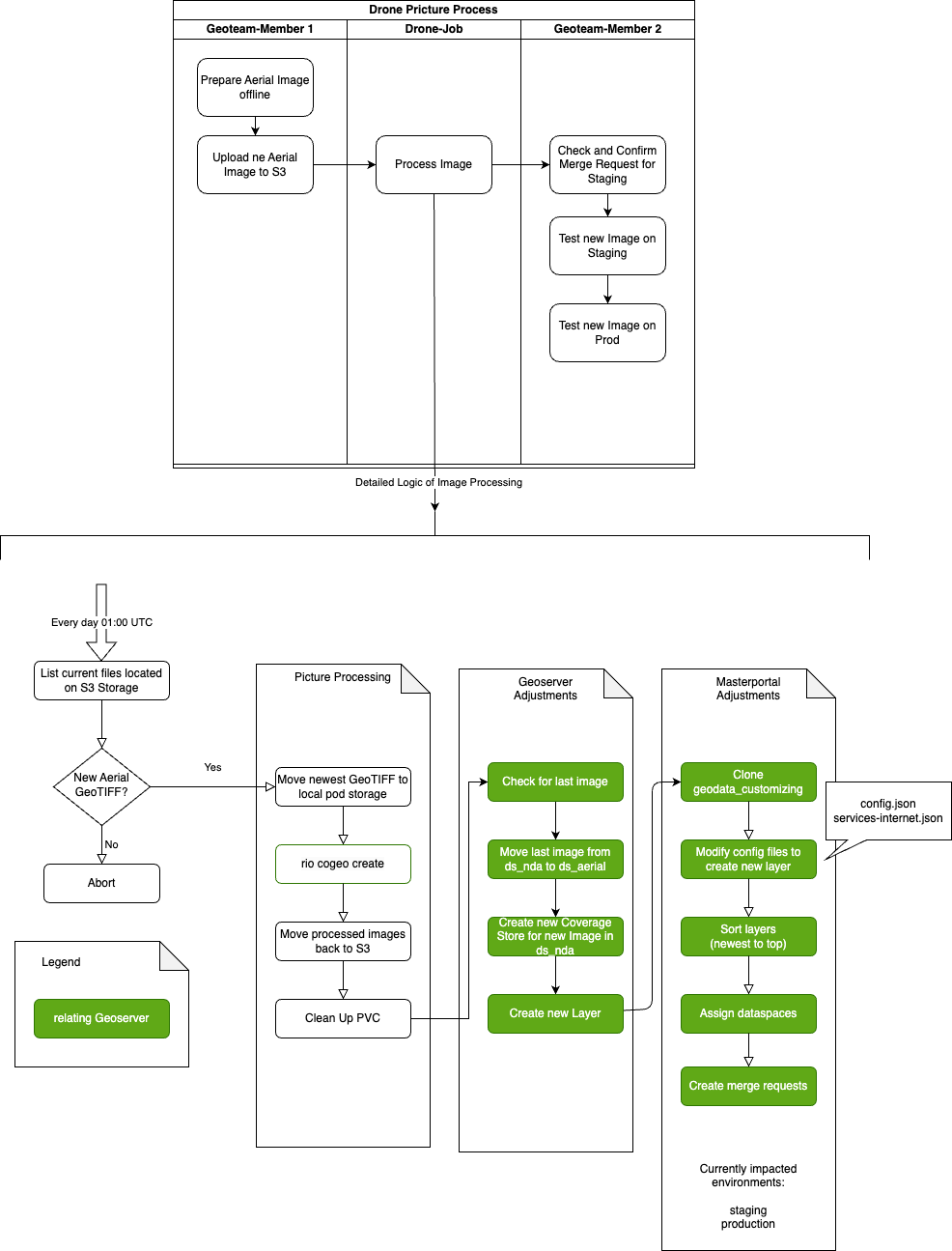
Process Steps
Prepare Aerial Image offline
A member of the geodata team prepares the geotiff for the current week
Upload new Aerial Image to S3
A member of the geodata team uploads the picture with the naming convention YYYYMMDD_Gesamtareal_dop.tif to the S3 Folder inbox/gesamtareal_dop/.
This is the current content from the inbox:

Process Image
The detailed logic of the background job is described in the second diagram above. The job checks every day the directory inbox/gesamtareal_dop/ for a new image and starts processing if a new one exists.
The job creates two merge requests in gitlab. The users, that are allowed to merge these, are subscribed to the
geodata_customizing repository. Based on this subscription, the users get informed by mail, that a new merge request exists.
Check and Confirm Merge Request for Staging
One member of the specific group of allowed users has to check the merge request and if the request can be merged, to confirm the requests. With the confirmation gitlab starts to build the new container images which are then automatically deployed.
Test new Image on Staging
After the deployment, the same user tests if all works as expected
Check and Confirm Merge Request for Production
One member of the specific group of allowed users has to check the merge request and if the request can be merged, to confirm the requests. With the confirmation gitlab starts to build the new container images which are then automatically deployed.
Test new Image on Production
After the deployment, the same user tests if all works as expected
Integration with other custumizing changes
The general handling of customizing changes is described in the documentation of the geodata_customizing repository. The merge requests of the jobs are integrated in the process as every other merge requests.
The done job only changes seperated files for the masterportal configuration. These files are not changed manually by a user - so merge conflicts are avoided. All these files are located in the subfolder drone_image_content. You should ignore these files and do not any manual changes.